
Analyzing employee training can feel overwhelming especially when you don’t have a streamlined process. Perhaps your teams are still undergoing training using obsolete methods that are hard to track.
Alternatively, you might be working with outdated spreadsheets that are tedious to update. Or you’re stuck with training systems that keep employee information so locked down that only employees and their managers can see their progress.
This and so many more factors can make it quite hard for certification governance, skills tracking, and overall training oversight.
Up ahead, we’ll explore straightforward ways to use data to make sense of your training efforts, no matter the systems you have in place.
Inside Spreadsheet-Based Employee Tracking
Spreadsheets have long been a go-to tool for tracking employee training. They’re accessible, familiar, and flexible enough to be shaped into whatever you need—course schedules, progress logs, and even budget tracking.
For smaller teams or early-stage efforts, a well-organized spreadsheet can feel like a practical, no-frills solution. But as training programs grow, so do the limitations.
One of the biggest issues is that certain data types become difficult, if not impossible, to track effectively over time.
Things like training completion rates, certification expiry dates, or individual skill development across different roles quickly become overwhelming to manage manually.
Tracking learning history over time—for example, how a team member’s skills have progressed, or which training interventions led to performance improvements, is also nearly impossible to track without advanced filtering, formulas, or cross-sheet referencing. And even then, it takes hours.
Here are a few simple ways small teams can get the most out of spreadsheet-based tracking, although as your team scales, you may find it harder to keep everything organized without a more advanced system.
1. Use data validation and dropdowns:
Built-in features like dropdown menus and validation rules can help minimize entry errors—ensuring, for example, that course names are consistent or dates are formatted correctly across the board.
2. Automate what you can with formulas and scripts:
If you’re comfortable with a bit of technical work, tools like Excel macros or Google Sheets scripts can be used to automate repetitive tasks—like highlighting overdue training, or generating basic reports.
3. Protect your data with user permissions:
Where collaboration is necessary, limit editing rights and lock important fields to avoid accidental overwrites. Google Sheets allows for real-time sharing with controlled access, which helps avoid the version-control chaos.
4. Back up regularly and save versions:
Use a naming convention and save snapshots of your data regularly, so you always have a rollback option if something goes wrong.
5. Track only what you truly need:
It’s easy to get carried away trying to track every possible metric. Focus instead on what’s actually actionable—completion status, deadlines, certifications, and learning goals. The simpler your spreadsheet, the more manageable it becomes.
6. Use visual cues:
Color-coding cells or using conditional formatting can help bring attention to overdue tasks, upcoming renewals, or skills gaps—making your spreadsheet feel more like a live dashboard than a static table
A Database Approach to Training Management
If you’ve ever tried tracking employee training with spreadsheets, or wrestled with clunky enterprise systems that keep all the useful data locked behind layers of permissions, you know how frustrating it can be to get a clear picture of who’s trained, certified, or overdue.
That’s why some teams turn to simple, customizable databases to fill in the gaps.
Databases like MS Access or open-source tools can give you a clean, centralized way to log training progress, manage certifications, and even automate reminders or approvals.
However, you’ll need someone skilled in designing and managing databases, to efficiently utilize this method.
Here are some tips to keep in mind when using databases to track employee training.
1. Start with a clear data structure
Before you build anything, map out the key pieces of information you want to track: employee name, department, training courses, completion status, certification dates, renewal deadlines, etc. A clear structure avoids messy data later.
2. Keep data entry simple
Design user-friendly forms for entering and updating records. The simpler it is for team leads or admins to use, the more accurate and up-to-date your data will be.
3. Use drop-downs and validation rules
Avoid free-text fields for things like course names or departments—use dropdowns or preset options. It keeps your records clean and consistent.
4. Define access roles
Not everyone needs to see or edit everything. Set permissions so employees can view their progress, managers can update records, and HR or L&D teams can see the full picture.
5. Link related tables
Use relational tables—for example, link employee records to training records, and courses to certifications. This makes your data easier to query, analyze, and report on.
6. Build simple dashboards and reports
Use queries and visualizations to surface useful insights like:
– Who’s overdue for training?
– What certifications are expiring this quarter?
– What’s the overall completion rate per team?
7. Review and clean up
Every few months, check for duplicates, outdated records, or fields that aren’t being used. This keeps your system lean and useful.
Ditching the Manual Work with Training Software
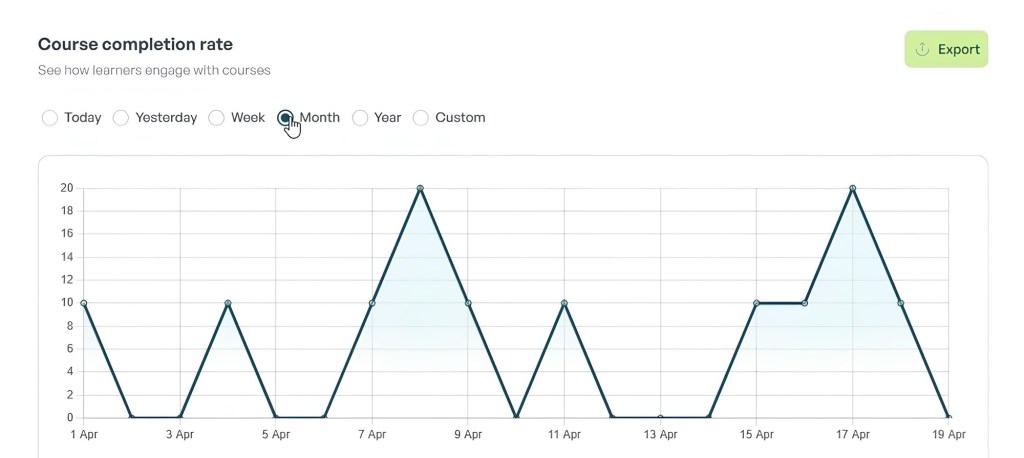
Manual systems, whether spreadsheets or homegrown databases, can work for a while. They’re flexible, familiar, and give you just enough control to get by.
But they also come with a cost: hours lost to data entry, version control headaches, and the constant struggle to get a clear, consolidated view of your training efforts.
At some point, the overhead starts to outweigh the benefits.
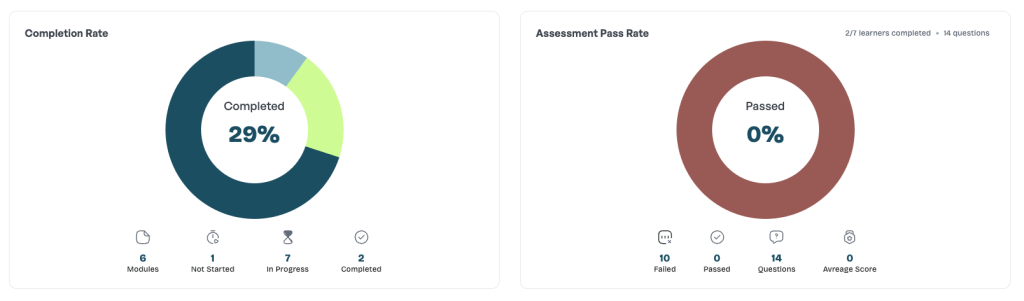
That’s where modern platforms built specifically for training management come in. Imagine being able to track certifications, schedule courses, send reminders, and pull reports—all without writing a single formula or building a database from scratch.
Tools like Varsi are designed to remove the friction. You don’t need to set up complex queries or tinker with validation rules. You get instant access to organized training data, team progress, and analytics that make sense—right out of the box.
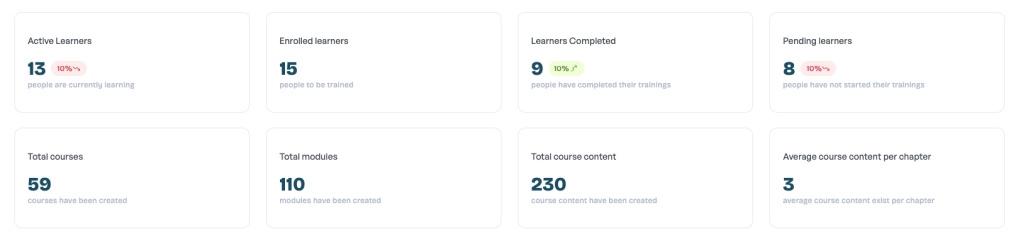
If you’ve ever felt buried under the weight of tracking training manually, maybe it’s time to explore a simpler, smarter way.
- Automated Training Tracking
No more manual data entry or complex spreadsheets—Varsi automatically records training progress and certifications as employees complete courses. - User-Friendly Interface
Intuitive dashboards and reports make it easy for managers and HR teams to get a clear overview without needing advanced Excel skills or database know-how. - Centralized Data Access
Unlike siloed systems with restricted access, Varsi provides controlled but broad visibility so relevant stakeholders can monitor training status without bottlenecks. - Built-In Workflows and Notifications
Automated reminders for upcoming certifications, course registrations, and approvals reduce administrative overhead and keep training on track. - Customizable Reporting & Analytics
Powerful yet simple tools help you analyze training completion rates, identify skills gaps, and track certification expiry—without building queries or formulas. - Role-Based Access Control
Granular permissions let you define who can view or edit training data, protecting sensitive employee information while keeping the right people informed. - Scalable Solution
Whether you’re a small team or a growing organization, Varsi adapts to your needs without the complexity of managing spreadsheets or databases. - Quick Implementation
No need to build or maintain your own system; Varsi’s ready-to-use platform lets you get started fast with minimal setup.
Ready to quit wrestling with spreadsheets and scattered systems?
Book a demo today and discover how easy it is to track, analyze, and improve training, without the manual hassle.
 blog.tryvarsi.com
Leave a comment